

Windows & Linux: GitHub Releases


The Problem: Conversations Everywhere, Visibility Nowhere
If you run an OpenClaw agent, you probably talk to it through WhatsApp, Telegram, Signal, or Discord. That works fine for casual interaction. But the moment you’re running more than one agent—or you want to understand what your agent is actually doing—messaging apps fall short.
Your conversation history is fragmented across platforms. You can’t search across channels. You have zero visibility into what’s happening under the hood: which tools the agent called, what arguments it used, how long execution took, whether it succeeded or failed. Messaging apps show you the output. They don’t show you the process.
And if you’re managing multiple agents—a work assistant on an Azure VM, a home automation bot on a Raspberry Pi, a persona bot running locally—there’s no single place to see them all.
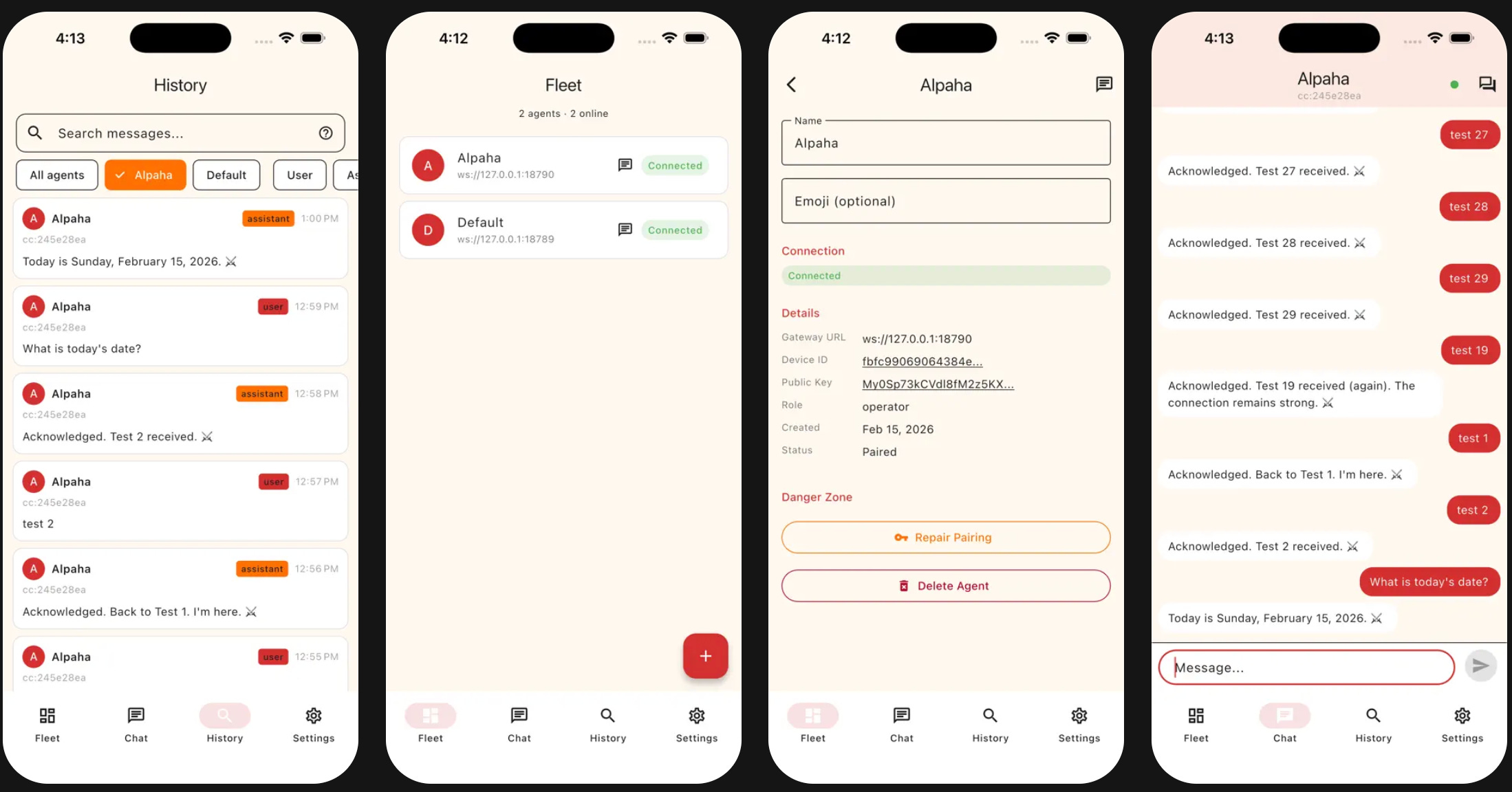
Claw Command fills that gap. It’s a native app that acts as a command center for your OpenClaw fleet.
What the App Does
Fleet Dashboard
The home screen shows all your connected OpenClaw gateways at a glance. Each agent card displays its name, gateway URL, and connection status. Add new agents by entering an OpenClaw gateway URL and completing the device pairing flow. Drag to reorder.
Chat with Deep Observability
This is the core differentiator. You get a full chat interface with real-time WebSocket streaming, but unlike messaging apps, you can see inside each response:
Tool execution blocks expand to show the tool name, arguments passed, live output streaming, execution duration, and success/failure status. When your agent searches the web, queries a database, or calls an API, you see exactly what happened.
Full-Text Search
Every message sent or received through Claw Command syncs to a local SQLite database with FTS5 indexing. Search across all your Claw Command sessions and agents. Filter by agent, role, or date range. Results are ranked by relevance with highlighted snippets. Your Claw Command conversation history becomes a searchable archive.
Multi-Session Management
Each agent supports multiple concurrent sessions. A session drawer lets you switch between conversations. Cross-channel sessions from WhatsApp, Telegram, Discord, and other platforms are visible as read-only previews, so you can see what your agent has been doing across all channels without leaving the app.
Network Discovery
On your local network, Claw Command uses mDNS (DNS-SD) to automatically discover OpenClaw gateways—no manual URL entry needed. It also detects Tailscale VPN status in Settings, which is the recommended way to securely connect to agents running on remote machines.
Export and Import
Export your chat history as CSV or JSON. Import JSON backups to restore data. Manage local storage with configurable message limits.
Technical Highlights
ED25519 Device Authentication
Claw Command doesn’t use passwords. Each device generates an ED25519 keypair on first launch, stored in the platform’s secure keychain (iOS Keychain, Android Keystore, macOS Keychain, etc.). The public key is exchanged during a one-time pairing flow with each OpenClaw gateway. Every subsequent WebSocket connection is authenticated by signing a challenge with the device’s private key.
This means your device is your credential. No passwords to leak, no tokens to rotate. If a device is compromised, you revoke its public key from the gateway.
FTS5 Search Architecture
Full-text search uses SQLite’s FTS5 extension, which runs entirely on-device. Messages are indexed as they arrive over WebSocket. The search implementation supports smart query syntax—phrases, prefix matching, boolean operators—giving you grep-like power over your agent history without any server dependency.
WebSocket Streaming with Offline Support
Messages stream in real-time over WebSocket connections to OpenClaw gateways, but the app doesn’t fall over when connectivity drops. A connection banner shows status changes, a message queue holds outbound messages during disconnection, and reconnection with sync happens automatically when the network returns.
Six Platforms from One Codebase
Claw Command ships on iOS, Android, macOS, Windows, and Linux from a single Flutter codebase. Platform-specific concerns—keychain APIs, window management, edge-to-edge display, icon bundling—are handled individually, but the core architecture is shared.
Challenges Worth Mentioning
Detecting Zombie WebSocket Connections
A WebSocket can be technically open but completely unresponsive—the gateway process hung, the network path silently dropped, or a VPN tunnel stalled. TCP keepalives don’t catch this fast enough. The OpenClaw gateway sends periodic tick events, and Claw Command watches the gap between them. If no tick arrives within twice the expected interval, the client force-closes the socket and triggers reconnection. Without this, the app would sit showing “connected” while nothing was actually getting through.
Message Deduplication on Reconnect
When the app reconnects to an OpenClaw gateway, it fetches recent messages to catch up on anything missed. But some of those messages might already be in the local database from before the disconnect. The app deduplicates by generating signatures from each message’s role and first 200 characters of content, stripping gateway metadata before comparison. This prevents duplicate messages in the chat history without disrupting any sends that were still in flight.
Tool Call State Machine
Tool executions aren’t instant—they can take seconds or minutes. The gateway streams tool call lifecycle events: start creates the tool call entry with a running indicator, update events accumulate partial output, and result finalizes with duration and success/failure status. The UI reflects each state: an animated spinner while running, expandable output as it streams in, and final status with execution time when complete.
Who It’s For
Claw Command is built for OpenClaw power users. If you run one agent and chat with it casually through WhatsApp, you probably don’t need this. But if you run multiple agents, want to understand what’s happening inside your conversations, or need a searchable archive of your agent history across all channels, this is the app.
Download: iOS App Store | Google Play Store | Windows & Linux (GitHub Releases)
Related: PropaneTracker, HayTracker, and DevHours - other Code Pasture apps built with Planning-Driven Development
For the methodology behind building apps with AI, see Planning-Driven Development: The Single Biggest Productivity Multiplier with GenAI Agents.