

Available now on iOS: Download on the App Store | Source: GitHub (GPL v3) | Android: Q1 2026
The Long Search for the Right Tool
For years, I wanted a simple time tracking app tailored to how developers actually work. Existing solutions were either too complex with features I’d never use, too generic to capture development-specific context, or subscription-based for functionality that should live locally on my device.
What I wanted was straightforward:
Track time against projects and work items (tickets, issues)
Categorize by task type (feature work, bug fixes, meetings, code review)
Generate reports for billing or personal productivity analysis
Export data in a standard format
Work offline with local storage
No subscription, no account, no server dependency
Nothing quite fit. So I built it myself.
Building with Claude Code
DevHours is my first mobile app. I built it with significant assistance from Claude Code, Anthropic’s AI coding assistant. The combination of Claude’s code generation capabilities with my architectural decisions and domain expertise made the development process remarkably efficient.
The entire codebase was developed using test-driven development (TDD). Domain models were written test-first, with 148 tests ensuring correctness across all CRUD operations, database migrations, and business logic. Claude Code helped maintain this discipline throughout, generating test cases and implementation code in lockstep.
The source is open under GPL v3: github.com/codepasture/devhours
Tech Stack
Framework: React Native with Expo SDK 54
Language: TypeScript (strict mode)
Navigation: React Navigation 7 with bottom tabs
UI Components: React Native Paper (Material Design 3)
State Management: Zustand
Database: SQLite via expo-sqlite (sql.js for web)
Testing: Jest with better-sqlite3 for fast in-memory tests
The architecture follows clean separation of concerns: domain models, infrastructure (repositories, database), screens/components, and typed Zustand stores.
Key Features
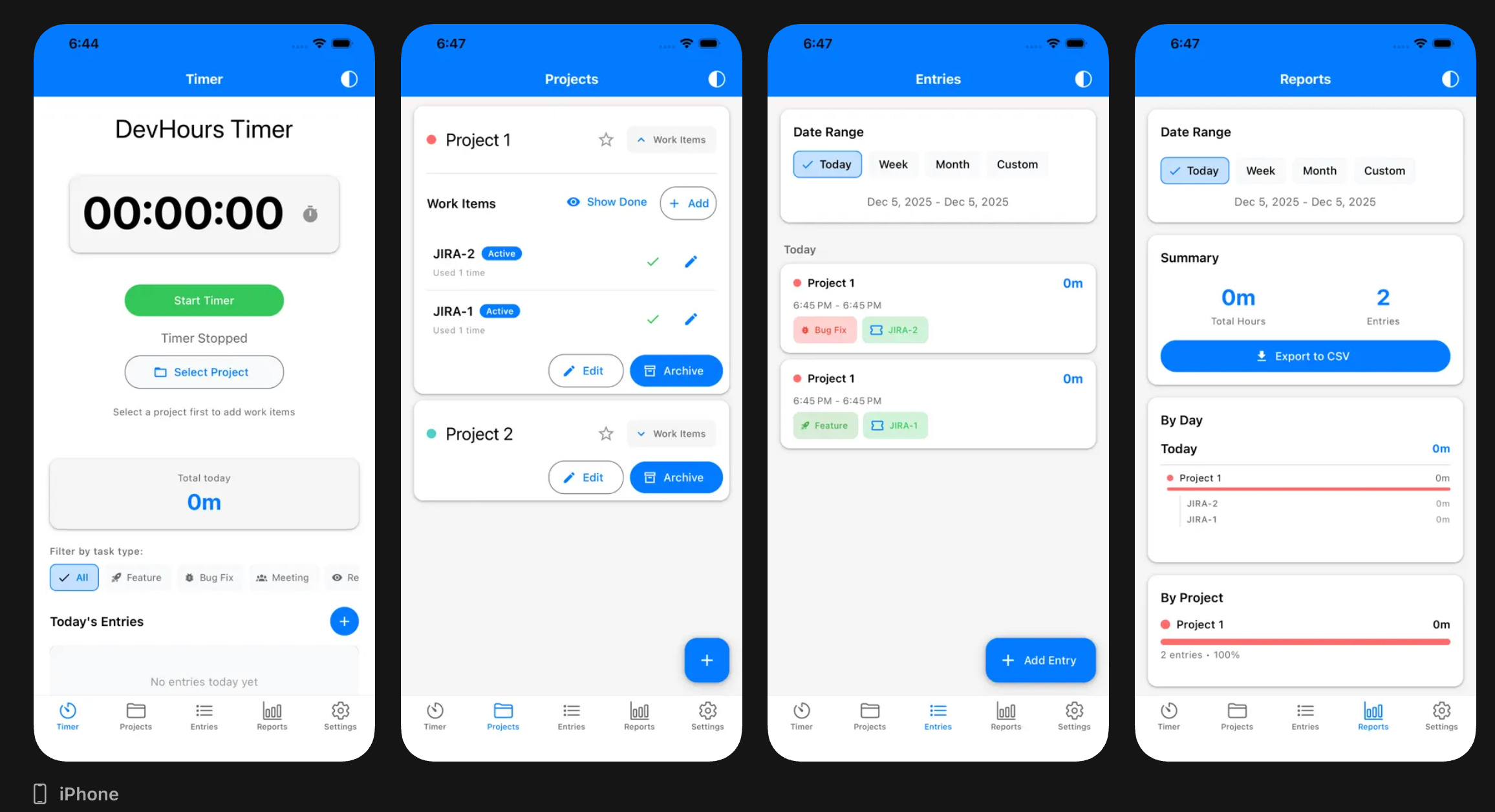
Timer and Manual Entry Start a timer when you begin work, or create entries manually for time you forgot to track. The running total shows completed time plus any active timer.
Projects and Work Items Organize time by project with custom colors. Within projects, create work items with external IDs (for JIRA tickets, GitHub issues, etc.) to track exactly what you worked on.
Task Types Categorize entries: Feature, Bug Fix, Meeting, Code Review, Refactor, Documentation, Testing, Research, Planning, Ops.
Reports View time breakdowns by day, project, or task type. Filter by custom date ranges.
Export Generate CSV files for billing, invoicing, or importing into other systems.
Themes Light, dark, and auto modes.
Lessons Learned
Building a React Native app for the first time surfaced several gotchas worth documenting:
Always use npx expo install for native modules. Using npm install directly can install versions incompatible with your Expo SDK, causing cryptic runtime crashes. Expo’s CLI selects SDK-compatible versions automatically.
UUID generation requires expo-crypto. The standard uuid package depends on crypto.getRandomValues(), which isn’t available in React Native. Use Crypto.randomUUID() from expo-crypto instead.
Avoid new architecture flags in Expo Go. Features like newArchEnabled and Android’s edgeToEdgeEnabled require custom development builds and cause errors in Expo Go.
Timezone handling matters. Early versions had a bug where evening entries appeared on the wrong day. Date operations need careful handling of local vs. UTC time.
iOS time pickers have quirks. The maximumDate prop was clamping selected times unexpectedly. Sometimes the platform-specific behavior requires platform-specific workarounds.
What’s Next
I’m actively using DevHours to track my own development time. It does exactly what I wanted: simple, focused time tracking without the overhead of complex project management features I don’t need.
The app is free. The source is open. If you’ve been looking for a developer-focused time tracker, give it a try.