

If your Flutter macOS app crashes with PlatformException -34018: A required entitlement isn't present when using flutter_secure_storage, the problem might not be your entitlements at all. Here’s a deep dive into a subtle bug in the plugin’s Darwin implementation that silently ignores your configuration.
The Problem
I was building a Flutter macOS app that stores sensitive credentials in the system keychain using flutter_secure_storage (v10.0.0). Every write operation failed with:
PlatformException(Unexpected security result code,
  Code: -34018, Message: A required entitlement isn't present., -34018, null)
Error -34018 is errSecMissingEntitlement — macOS is telling you the app lacks a required entitlement for the keychain operation you’re attempting.
The Rabbit Hole
I spent hours working through every fix suggested by GitHub issues and Stack Overflow:
1. Added keychain-access-groups entitlement to both DebugProfile.entitlements and Release.entitlements:
<key>com.apple.security.keychain-access-groups</key>
<array>
    <string>$(AppIdentifierPrefix)com.example.myApp</string>
</array>
Still failed.
2. Added DEVELOPMENT_TEAM to project.pbxproj so $(AppIdentifierPrefix) resolves correctly:
DEVELOPMENT_TEAM = XXXXXXXXXX;Verified with codesign -d --entitlements :- that the built binary had the correct resolved entitlement. Still failed.
3. Changed CODE_SIGN_IDENTITY from ad-hoc ("-") to "Apple Development":
CODE_SIGN_IDENTITY = "Apple Development";
Confirmed via codesign -dvv the app was properly signed with a valid Apple Development certificate, correct Team ID, and all entitlements present. Still failed.
4. Tried the MacOsOptions escape hatch — the plugin offers usesDataProtectionKeychain: false to use the legacy keychain, which doesn’t require a provisioning profile:
final storage = const FlutterSecureStorage();
await storage.write(
  key: 'my_key',
  value: 'my_value',
  mOptions: const MacOsOptions(usesDataProtectionKeychain: false),
);
Still failed with the exact same error. This is when Claude Code started reading the plugin’s source code.
The Root Cause: A Key Name Mismatch
The flutter_secure_storage package delegates to a platform-specific plugin on macOS: flutter_secure_storage_darwin (v0.2.0). The Dart side and Swift side disagree on the name of a critical configuration key.
Dart side — MacOsOptions.toMap() produces:
@override
Map<String, String> toMap() => <String, String>{
  ...super.toMap(),
  'usesDataProtectionKeychain': '$usesDataProtectionKeychain',
};
Swift side — FlutterSecureStorageDarwinPlugin.swift reads:
usesDataProtectionKeychain: (options["useDataProtectionKeyChain"] as? String)
    .flatMap { Bool($0) } ?? true,
Spot the difference?
Dart sendsSwift readsKey nameusesDataProtectionKeychainuseDataProtectionKeyChainPrefixuses (with ‘s’)use (no ‘s’)Casingkeychain (lowercase)KeyChain (uppercase C)
These are completely different strings. The Swift code never finds the Dart-supplied option, so it falls through to the default: ?? true. The Data Protection Keychain is always used, regardless of what you set in Dart.
This bug was introduced in v10.0.0 when the iOS and macOS implementations were merged into the unified flutter_secure_storage_darwin package. The original parameter was named useDataProtectionKeyChain (added in v9.2.3), but the Dart-side MacOsOptions class was renamed to usesDataProtectionKeychain without updating the Swift reader.
It’s Not Just One Key
After finding the usesDataProtectionKeychain mismatch, I audited every option key between the Dart AppleOptions.toMap() and the Swift parseCall(). There are actually four mismatches:
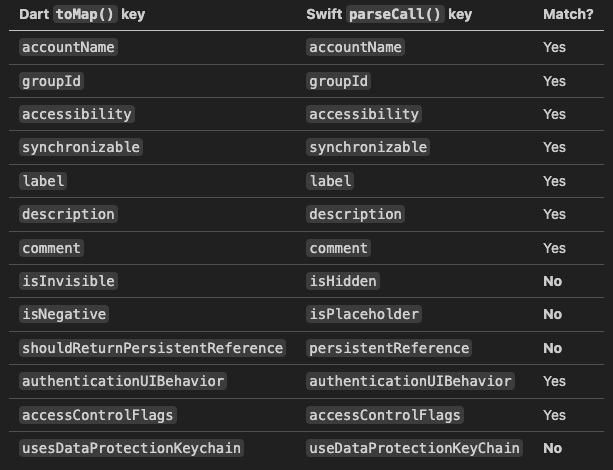
The first three mismatches (isInvisible/isHidden, isNegative/isPlaceholder, shouldReturnPersistentReference/persistentReference) are all obscure options that default to null/unset, so they silently no-op. The only one that causes real damage is usesDataProtectionKeychain because it defaults to true when the key isn’t found.
The Fix
Create a subclass that overrides toMap() to add the key name the Swift code actually reads, while keeping the original key for forward-compatibility when the plugin is eventually fixed:
import 'package:flutter_secure_storage/flutter_secure_storage.dart';

/// Workaround for a key-name mismatch in flutter_secure_storage_darwin v0.2.0.
///
/// Dart's MacOsOptions.toMap() emits 'usesDataProtectionKeychain', but the
/// Swift plugin reads 'useDataProtectionKeyChain' (different casing, no 's').
/// This subclass adds the correct key so the option reaches native code,
/// while keeping the original for forward-compatibility.
class FixedMacOsOptions extends MacOsOptions {
  const FixedMacOsOptions({super.usesDataProtectionKeychain});

  @override
  Map<String, String> toMap() {
    final map = super.toMap();
    final value = map['usesDataProtectionKeychain'];
    if (value != null) {
      map['useDataProtectionKeyChain'] = value;
    }
    return map;
  }
}
By keeping both keys in the map, the current buggy Swift code reads useDataProtectionKeyChain, and a future fixed plugin can read usesDataProtectionKeychain. No breakage either way.
Then use it in your secure storage calls:
const macOsOptions = FixedMacOsOptions(usesDataProtectionKeychain: false);

final storage = const FlutterSecureStorage();

// Read
await storage.read(key: 'my_key', mOptions: macOsOptions);

// Write
await storage.write(key: 'my_key', value: 'secret', mOptions: macOsOptions);

// Delete
await storage.delete(key: 'my_key', mOptions: macOsOptions);
With usesDataProtectionKeychain: false actually reaching the native code, the plugin uses the legacy macOS keychain instead of the Data Protection Keychain. The legacy keychain doesn’t require a provisioning profile, so it works with standard development signing.
Add a Unit Test
Since this workaround depends on exact string matching, pin it with a test:
test('toMap includes both Dart and Swift key names', () {
  const options = FixedMacOsOptions(usesDataProtectionKeychain: false);
  final map = options.toMap();

  // Swift plugin (v0.2.0) reads this key:
  expect(map['useDataProtectionKeyChain'], 'false');
  // Dart key kept for forward-compatibility:
  expect(map['usesDataProtectionKeychain'], 'false');
});
Legacy Keychain vs Data Protection Keychain
Using usesDataProtectionKeychain: false is a trade-off worth understanding.
Data Protection Keychain (DPK) is Apple’s recommended path for new apps. It provides iOS-like behavior on macOS with better integration with modern platform protection. However, it requires a provisioning profile, which means either Xcode automatic signing or manual profile management through the Apple Developer portal.
Legacy Keychain works without a provisioning profile and is the practical choice when:
You’re in early development and haven’t set up provisioning
You’re building a tool that needs to work with ad-hoc or local-development signing
The
flutter_secure_storageplugin has a bug preventing DPK from working (like this one)
The legacy keychain still encrypts items and scopes access per-app by service name (which flutter_secure_storage sets to the bundle ID by default). Items default to kSecAttrAccessibleWhenUnlocked (only accessible when the device is unlocked) and are not synchronized to iCloud.
If you’re going to production, plan to migrate to DPK once either the plugin fixes the key mismatch or you set up proper provisioning profiles.
Why This Bug Is Hard to Find
No error at the Dart level. The option is accepted, serialized, and sent to the native side without complaint.
No error at the Swift level. The Swift code doesn’t find the key, silently uses the default, and proceeds — the failure only surfaces later as a keychain access error.
The error message is misleading.
-34018says “entitlement missing,” so you naturally focus on entitlements, signing, and provisioning — not on whether the plugin is reading your options correctly.The option name is almost right.
usesDataProtectionKeychainvsuseDataProtectionKeyChain— you’d need to compare them character by character to notice the difference.
Quick Diagnostic
If you’re unsure whether keychain access works at all, add a smoke test at app startup:
void main() {
  WidgetsFlutterBinding.ensureInitialized(); // Required for platform channels

  _testKeychainAccess();

  runApp(const MyApp());
}

Future<void> _testKeychainAccess() async {
  const options = FixedMacOsOptions(usesDataProtectionKeychain: false);
  const storage = FlutterSecureStorage();
  try {
    await storage.write(key: '_test', value: 'ok', mOptions: options);
    final result = await storage.read(key: '_test', mOptions: options);
    await storage.delete(key: '_test', mOptions: options);
    debugPrint('[KEYCHAIN] diagnostic: ${result == 'ok' ? 'PASS' : 'FAIL'}');
  } catch (e) {
    debugPrint('[KEYCHAIN] diagnostic: FAIL ($e)');
  }
}
Note: WidgetsFlutterBinding.ensureInitialized() must be called before any platform channel operations, including secure storage.
Key Takeaways
Error -34018 doesn’t always mean your entitlements are wrong. It can also mean the plugin is silently using the wrong keychain type.
MacOsOptions(usesDataProtectionKeychain: false)doesn’t work influtter_secure_storage_darwinv0.2.0 due to a key name mismatch between Dart and Swift.The mismatch isn’t limited to one key. Four option keys have drifted between Dart and Swift in this plugin version, though only
usesDataProtectionKeychaincauses visible failures.The fix is a small
toMap()override that emits both the old and new key names for forward-compatibility. Pin it with a unit test.When a plugin option seems to have no effect, read the native source. The Dart API and native implementation may have drifted apart, especially after major refactors.
References
GitHub Issue #804: Secure storage crashes with “A required entitlement isn’t present” on MacOS
Apple Developer Documentation: kSecUseDataProtectionKeychain
Apple Developer: Sharing access to keychain items among a collection of apps
Discovered while building a Flutter macOS app that stores device credentials in the system keychain. The entire debugging session — from “must be an entitlement issue” to “wait, the plugin has a typo” — took several hours. The four-key mismatch audit was prompted by a security review that asked “are there other drifted keys?” Hopefully this saves you the same trip.